Building a Personal Fitness Assistant with OpenClaw
Stop letting it chat aimlessly. Turn it into a sports assistant that truly understands you and gets things done.
Foreword
Lately, I've fallen down the rabbit hole of OpenClaw ("Crayfish"). The more I tinker with it, the more I realize it has solid potential, especially for being transformed into a personal assistant that runs 24/7.
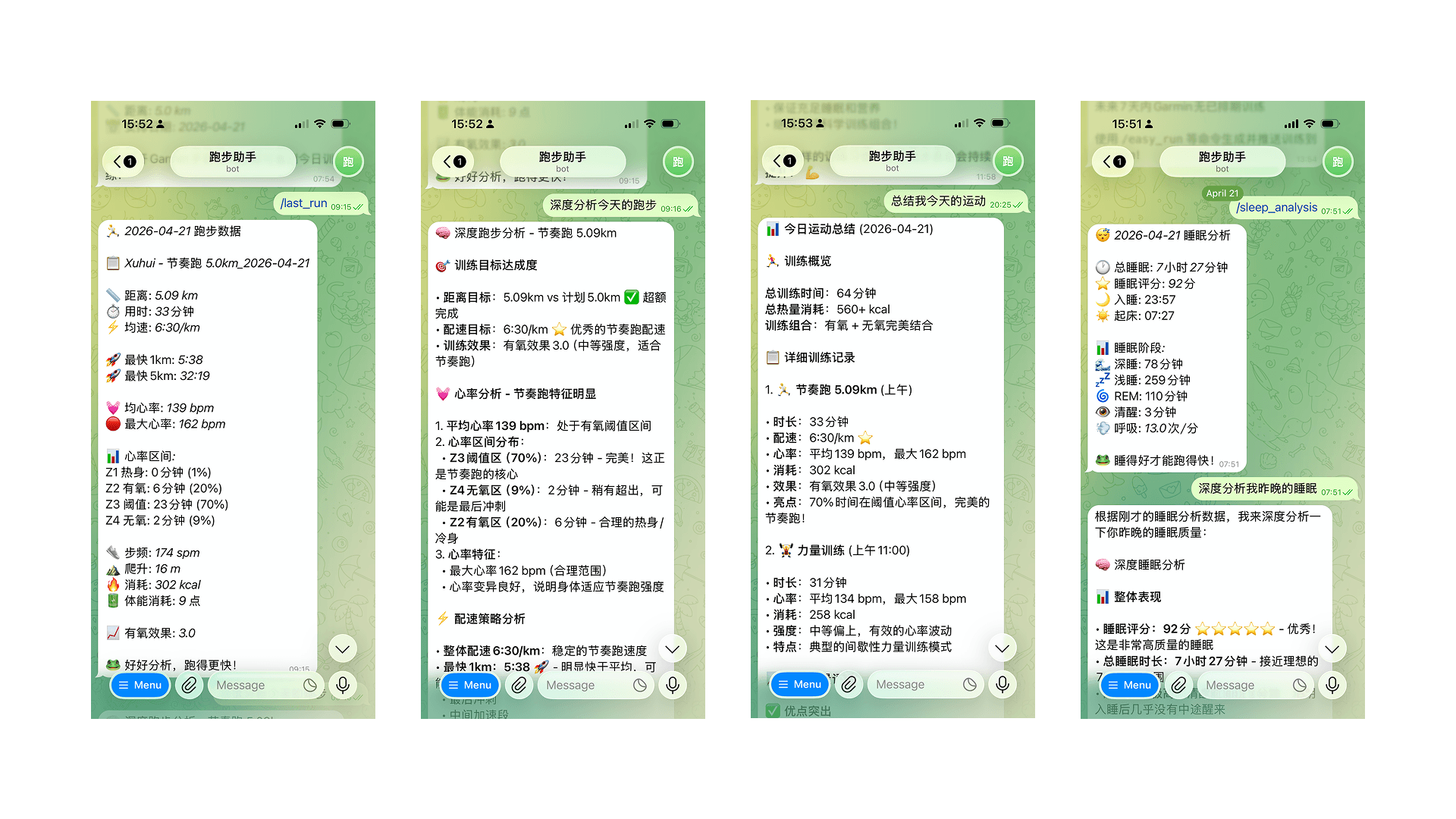
My hobbies are running and hiking, so a very specific idea popped into my head: could I turn it from a "chatbot" into a workout partner that truly understands me? Not a passive tool that only answers when asked, but one that proactively pulls my running data, generates training plans and pushes them to Garmin, and even sends me a deep analysis report like a personal coach after a run.
After some tinkering, I found it's not only possible, but once it's set up, the experience is incredibly smooth. The real key isn't about letting the AI figure everything out on its own, but about solidifying those repetitive, mundane tasks into a fixed workflow. This saves tokens (saving money) and is much more practical.
Hardware and Tools: Good Enough is Perfect
My setup is simple, nothing fancy:
- Device: Raspberry Pi 5 (the best choice for collecting dust in the corner)
- Sports Watch: Garmin (long battery life, open API)
- Chat Interface: Telegram Bot (just tap on your phone)
A little device like the Raspberry Pi 5 is perfect for this: online 24/7, incredibly low power consumption, silent – you barely notice it's there. The beauty of Telegram Bot is that I can customize the menu buttons, a godsend for lazy people. In daily use, I open Telegram, tap the menu, and all my health data for the day, how I slept last night, and how my last run went are right there.
Seriously, this is crucial for "usability." We're tinkering with this to use it, not just to take a screenshot and show off on social media.
The First Pitfall: Tokens Burning a Hole in My Pocket
By default, OpenClaw stuffs a ton of context files into the workspace directory – personality settings, user profiles, work rules, conversation memories. It sounds advanced, but the problem is, every time it runs, it loads all of this into the context. The consequence is that token consumption burns through money like crazy.
Naively, I connected the DeepSeek API, thinking it would be cheap. After two days, I checked the bill: wow, it had burned through a decent amount of money in just a few days. The problem wasn't a single call, but that whenever it encountered a "vague task," it flailed around like a headless fly: frantically probing, writing a bunch of temporary, messy code, and repeatedly confirming the context. Round after round, tokens were wasted, and very little actual work was done.
Later, I switched to Claude to help refine the requirements for my workout assistant. It was noticeably more reliable for this type of task – clear thinking, no beating around the bush, going straight from requirements to code. Of course, for the daily API calls running "Crayfish," I still use DeepSeek. I'm on a budget, and its price is unbeatable, plus its Chinese comprehension is excellent.
This experience made me realize one thing completely: For those repetitive, deterministic tasks, never let the AI improvise on the fly. You need to engineer these tasks first.
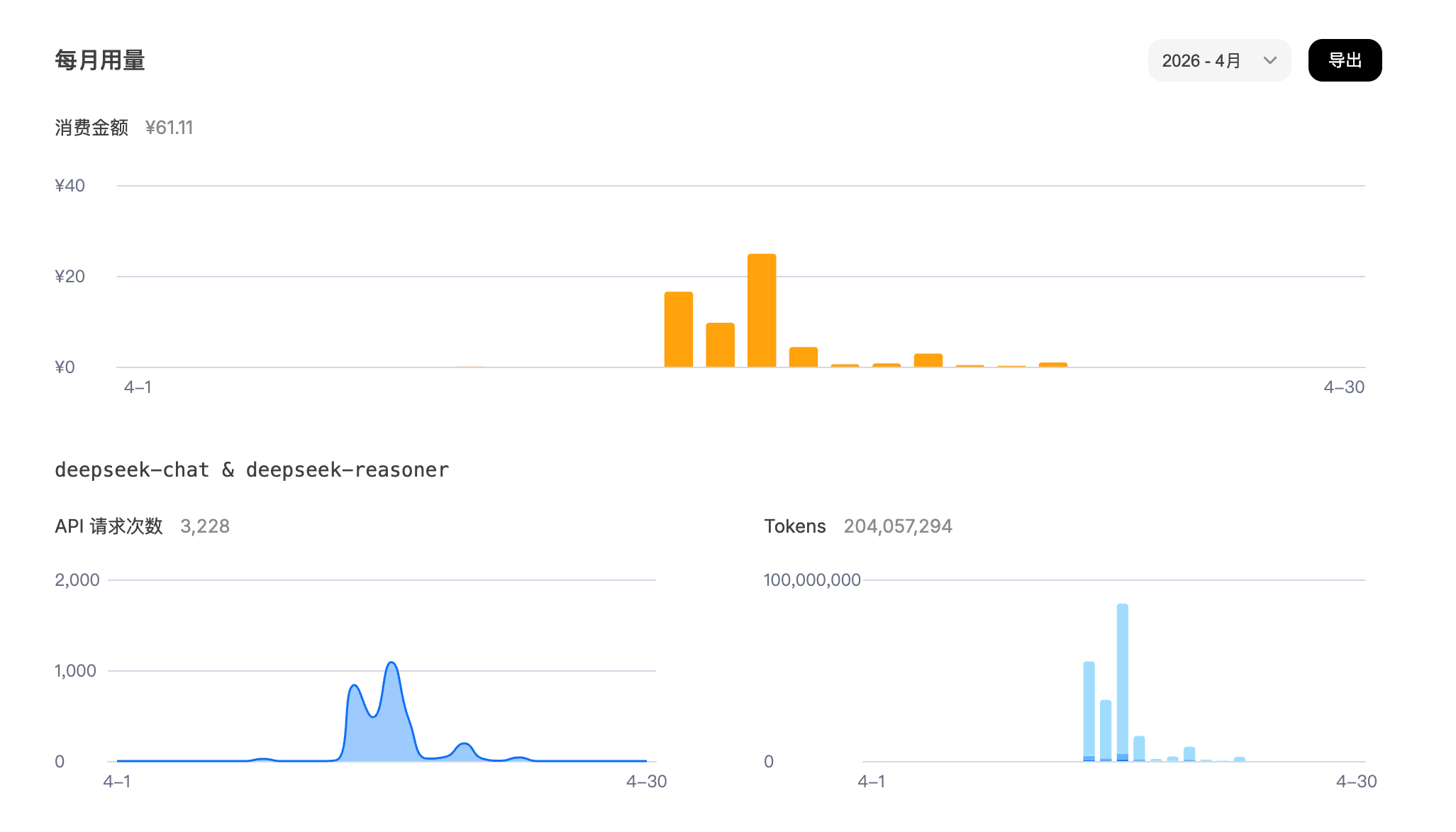
The image above is very telling. In the early days when requirements were vague, usage skyrocketed (80 million tokens in one day). Once I solidified those messy tasks into engineered tasks, consumption dropped to less than 1% of the previous amount (less than 20 cents).
Core Idea: Three Steps to Make "Crayfish" Actually Work
The whole plan boils down to three steps – simple, crude, but extremely effective:
- Write common commands as scripts
- Package scripts as OpenClaw Skills
- Separate "data retrieval" from "analysis," each doing its own job
It may only be three steps, but this is the difference between a "toy" and a "tool."
Step 1: Write High-Frequency Operations as Scripts Directly
Don't be lazy. Instead of letting the AI scramble to figure out "how to get data from Garmin" or "how to generate a training plan" every time, just package these tasks into scripts yourself.
Put all scripts into the Skill directory for unified management. For example, I put the most common data query commands into garmin_commands.py:
# Today's health data
python3 skills/garmin-workout/scripts/garmin_commands.py health_data

# Last night's sleep analysis
python3 skills/garmin-workout/scripts/garmin_commands.py sleep_analysis

# Last run
python3 skills/garmin-workout/scripts/garmin_commands.py last_run
Training generation and pushing go through another entry point, skill.py:
# Generate and push an easy run to Garmin Connect
python3 ~/.openclaw/workspace/skills/garmin-workout/scripts/skill.py \
  --command generate_and_push --args '{"command": "/easy_run 8km tomorrow"}'
The meaning of this is simple and direct: AI, stop pretending to be smart. All you need to do is "call the tool."
I set up 6 custom training types, each with a preset structure and pace to prevent it from making things up:
| Command | Type | Structure |
|---|---|---|
/easy_run | Easy Run | Warm-up → Main Run @6:30–7:00/km → Cool-down |
/tempo_run | Tempo Run | Warm-up → Main Run @5:20–5:40/km → Cool-down |
/long_run | Long Run | Warm-up → Main Run @5:50–6:10/km → Cool-down |
/interval_run | Interval | Warm-up → Repeat structure → Cool-down |
/recovery_run | Recovery | Warm-up → Main Run @7:15–7:45/km → Cool-down |
/fartlek_run | Fartlek | Warm-up → Repeat structure → Cool-down |
After this step, daily commands respond in seconds and cost almost nothing in reasoning.
Step 2: Package Scripts as OpenClaw Skills
Having scripts isn't enough. To let "Crayfish" know when to use them, you need to package them as a Skill.
The core of a Skill is a SKILL.md file, placed in skills/garmin-workout/. It essentially tells the AI:
- What this thing is for
- When it should be used
- What the commands look like
- How to pass parameters
For example:
---
name: garmin-workout
description: Garmin Connect integration for running training. Use when user asks about
             workouts, training plans, pushing sessions to Garmin Connect, health data
             (sleep, VO2 Max, heart rate, body battery, stress). Covers all 6 workout types.
---
This step is critical because it solves a real problem: Every time the AI restarts, it's an amnesiac. You can't expect it to "remember" anything. You need to give it a structured entry point to find things itself.
The scripts are just tools; Only when you write the Skill clearly does the AI know what it's for and when to use it.
In the last part of SKILL.md, I created a complete mapping of all Telegram commands to their corresponding execution scripts, like this:
| Telegram Command | Execution Script |
|---|---|
/last_run | python3 .../garmin_commands.py last_run |
/sleep_analysis | python3 .../garmin_commands.py sleep_analysis |
/easy_run 8km tomorrow | skill.py --command generate_and_push ... |
The rules are also written very directly:
Upon receiving these commands, immediately run the corresponding script and return the output as-is; do not ask the user what data they want, and do not generate exploratory code on the fly.
After this, the system is rock solid: no detours, no probing, no repeated confirmations – just get it done.
By the way, AGENTS.md is a different matter – it's the core behavioral specification for the workspace, governing memory writing rules, heartbeat check logic, group chat behavior, etc. At the start of each session, it also silently runs update_menu to restore the Telegram Bot's 23 custom commands, preventing them from being overwritten by the system's default menu.
Step 3: Use AI's Strengths Where They Matter (Analysis)
Scripting high-frequency tasks doesn't mean abandoning the value of AI. Quite the opposite: The place where AI is needed is "analysis," not "data retrieval."
For example, after a run, I first send /last_run to get a structured data summary:
🏃 2026-04-21 Running Data

📋 Xuhui - Tempo Run 5.0km_2026-04-21

📏 Distance: 5.09 km
⏱️ Time: 33 minutes
⚡ Avg Pace: 6:30/km

🚀 Fastest 1km: 5:38
🚀 Fastest 5km: 32:19

💓 Avg HR: 139 bpm
🔴 Max HR: 162 bpm

... (some details omitted)
This stage is purely script execution, costing almost nothing. Then I ask: "How was this run? What should I adjust next time?" This is when I let the AI enter analysis mode.
Based on metrics like heart rate, pace, and cadence, it can give me advice like a real coach:
Master Bao, compared to your tempo run on April 17th (7:03/km, HR 132), you improved your pace by 33 seconds per kilometer this time; Your HR went from 132 to 139 bpm, the intensity increased, which is great; Your training effect also went from 2.8 to 3.0, showing visible progress.
I later realized this "two-step" design is the essence:
- Queries go through scripts – fast, stable, and cheap
- Analysis is given to the AI – slower is fine, but it needs to deliver substance
Because of this separation, the system truly became both practical and valuable with AI.
Real-World Experience: It Finally Feels Like a Real Assistant
Now, my Telegram menu has roughly these items.
Training Related
/training_plan– Check next week's plan/easy_run 5km today– Generate an easy run, push to Garmin/tempo_run 8km tomorrow– Generate a tempo run/long_run 10km weekend– Generate a long run/interval_run today– Generate an interval run/garmin_workouts– View this week's training schedule/weekly_review– Weekly training summary/race_readiness– Race readiness assessment/pace_progress– Pace progress trend (specify weeks)
Health Data Related
/health_data– How's my body today?/sleep_analysis– Did I sleep well last night?/last_run– How was my last run?/running_stats– Data stats for the past 7 days/body_battery– How much energy do I have left?/vo2max– VO2 Max trend/heart_rate– Today's heart rate data/stress_level– Stress level
For example, I send:
/easy_run 8km tomorrow
A few seconds later, I open Garmin Connect, and a new training session appears on tomorrow's calendar: warm-up, main run, cool-down, with target pace already set.
This feels different. It's no longer a Q&A chat tool; it's a personal workout assistant that can actually execute actions for you.
Current Directory Structure (Clean and Comfortable)
The whole project currently looks like this:
~/.openclaw/workspace/
├── AGENTS.md          # Workspace core behavior rules (memory, heartbeat, group chat)
├── IDENTITY.md        # AI identity definition (name, role, avatar)
├── SOUL.md            # AI personality and behavior guidelines
├── USER.md            # User information
├── TOOLS.md           # Local tool configuration (SSH, device aliases, etc.)
├── HEARTBEAT.md       # Scheduled inspection task list
├── memory/            # Session memory (archived by date)
├── profiles/          # User profiles
├── state/             # Runtime state storage
└── skills/
    └── garmin-workout/
        ├── SKILL.md                   # Skill description + Telegram command routing (AI entry point)
        ├── runner_profile.json        # Runner profile configuration
        ├── training_plan_state.json   # Training plan persistence state
        ├── scripts/
        │   ├── garmin_commands.py            # Unified health data entry point
        │   ├── skill.py                      # Training generation + push
        │   ├── garmin_auth.py                # Authentication management
        │   ├── generate_workout.py           # Generate training JSON
        │   └── garmin_push.py                # Low-level push (includes repeat expansion)
        └── workouts_template/
            ├── easy_run_5km.json
            ├── tempo_run_5km.json
            ├── long_run_10km.json
            ├── recovery_run_3km.json
            ├── interval_run_simple.json
            └── fartlek_run_simple.json
From an engineering perspective, the advantage of this structure is clear responsibilities, easy maintenance, and convenient for adding new features later.
training_plan_state.json is particularly worth mentioning – a small detail I added later to persist the weekly training schedule. Previously, if I adjusted the training plan, it would all be lost after a session restart. Now, every time I modify the plan, the data is immediately written to this file. The next time I open /training_plan, the content is still there. This design philosophy of "write it down, don't rely on memory" is perfectly aligned with the overall system's approach.
Backup: Think Ahead
OpenClaw's configuration, memory, and skills are all in ~/.openclaw. So the most direct method is to periodically package this directory.
# Backup the entire openclaw configuration
tar -czf openclaw_backup_$(date +%Y%m%d).tar.gz ~/.openclaw

# Or just backup the workspace (skills, scripts, memory)
tar -czf workspace_backup_$(date +%Y%m%d).tar.gz ~/.openclaw/workspace
Add a cron job to automatically sync it to a cloud drive or NAS daily. This way, even if the Raspberry Pi's SD card fails, critical things like training memories, Skill configurations, training plan states, and Telegram menus can be quickly restored.
For a personal assistant running long-term, backup isn't a "we'll deal with it later" thing; it's something to think about from day one.
Summary
After all this tinkering, my biggest takeaway is: To turn this into a truly useful personal workout assistant, the key isn't making the AI "smarter," but making the system's division of labor clearer.
The core idea is this simple:
- Solidify high-frequency operations into scripts: For deterministic tasks like querying Garmin data or generating training plans, don't let the AI improvise.
- Use Skills to solidify entry points: Let the AI know where the tools are and when to use them each time it starts, and manage Telegram command routing together.
- Separate queries from analysis: Use scripts for daily data queries (saves money, fast), and only use AI for deep advice (quality, insightful).
- Persist state: Write things like training plans and runner profiles into files, don't rely on the AI's "memory."
When the Raspberry Pi is online 24/7, Telegram becomes your interaction interface, and Garmin handles the execution, this whole system is no longer just a "chatty AI," but more like a workout partner truly integrated into your life.
Related Project
Github Repo: sayidhe/openclaw-garmin-workout